All Stories
Showing posts with label Facebook. Show all posts

September 12, 2014

Delete Facebook History - A Mandatory Task to Keep Your Privacy Protected

Have you ever wondered if your Face Book search history can be remembered by FB? And, if it is a matter of concern, you need to take note of the simple ways to keep your privacy protected and continue to maintain information that is always personal to you.

Delete Your Facebook History


You can search for anything on Face Book, it’s your choice 


We all know Face Book is all about people and people profiles. It is very common for you to go on search for many people who may or may not be connected to you in some way or the other. Now, what if you are curious to know the where about of your Ex – boyfriend of girlfriend, and what about researching on your own girlfriend and people associated with her? You may not find it appropriate for people close to you to know your search trends in detail. By now, you are pretty much aware that FB saves and displays your search history and therefore you would want to know how to clean up the search history entirely or only the search items you prefer to delete.

Simple steps to reach to the search history and delete the same –


1.      When you log-on to your Face Book account, you would find an option called ‘Activity Log’. You can find this on your cover page towards the bottom right, next to ‘Update Info’. It has the complete details of your activates including posts and Search History, to be precise.

Activity-log Demo Picture


2.      Reach out to the left hand menu, Click on - More option. You would find this under photos, likes and comments.

3.      Upon exploring more options, you can find Search, by scrolling down. You will find all your search history in an itemized way, also in the order of date. Once you are on the search page, you can clean up your search history by clicking on – Clear Searches options. Clear Searches option can be easily found on the top right of the Search page.

4.      FB sends the Pop Up message to confirm your clear search request, once you okay it, you know your search history is clean and you are free of any apprehension.   

How important and how often?


You also might be relieved to know that the Face Book doesn’t show your search history to anyone but you. However, in today’s absurdity of hacking of all possible networks including that of Google’s and I - Cloud’s, the risk of protecting your privacy is your own. When there is an available option at hand, it is always wiser to exploit to save any embarrassment as well as anxiety of any kind.   


Face Book is one of the most engaging social platforms and it becomes more effective if you cautiously work on your privacy options from time to time. Depending on the sensitivity of the information you search for, you need to schedule your activity review. There is no great idea such as privacy and it’s precious!!       
12:01 pm - By blogger 0

August 03, 2014

How To Send Facebook Friend Request to All Your LinkedIn Connections

If you have too many friends on LinkedIn and you want to include them in your Facebook account - Read this article carefully! As we know both Facebook and LinkedIn are very popular social networks, but so far there is no direct way of connecting with each other. 

Invite LinkedIn Connections to Join You on Facebook 
Also Read : " How to Invite Your All LinkedIn Connections to Like Your Facebook Page in Single Click"

After a long search on the internet, I found this method where I can send a Facebook  friend request to my 3000 LinkedIn connections in single click without fear of to block Facebook friend request. 

Lets Follow these simple steps to complete this task 

Step.1  Login to your LinkedIn profile and download your all connection in your computer to excel CSV Format. 

If you don't know, how it will save,  just read this ("How to Export Your LinkedIn Contacts in Your Computer")
       

Step.2 After Download your LinkedIn contacts now open this CSV File in Excel and copy all Email addresses from email column. 

Copy Emails From Excel File

Step.3 Now open your Facebook profile and open Facebook PHP invite Page than copy and paste your all Emails in "To Box" and type a Message in "Message box". For example you can type " Hello There, Please join me on Facebook" or anything whatever you like write. 

PHP Invite Page

After fill up above information, Finally click on "Invite Your Friends" Button to send your Facebook friend request. It will show you a confirmation message to successfully send  your friend requests along with all your email address. 
Thats It, You have done this successfully!!!!
Still If you are facing any problem please feel free write in comments.

Download This Article in a PDF Format -  

11:38 pm - By blogger 0

July 29, 2014

5 Facebook Graph Searches that May Provide Your Business a Grip

Facebook Graph Searches is  helpful and addictive, proceed with caution, At it’s core, Facebook is regarding people—who they're, what they like, wherever they've been, etc.—and up till recently it’s been comparatively tough to collate that data for businesses. Sure, brand pages have had access to Insights, however the small print were never like this. Here square measure seven searches to kind into the Facebook search bar to unlock a hoarded wealth of actionable information.

Also Read:  How to download YouTube playlist in Smartphone using TubeMate

1. Search Tip: “People who like Your Business and…”

Insight: this straightforward search unleashes endless potentialities for your business. once the “and” you'll embrace the other whole that’s on Facebook (i.e., “People who like Hitched Media and Nestle“). you'll additionally embrace Associate in interest some of which are  like “cheese” or personal data, like “are faculty graduates.” beginning with this gap search phrase can begin to spark your imagination to different potentialities.

2. Search Tip: “Games people by who like Your Business”

Insight: Games have long been the entry to interface adoption and to incentive-based behaviors. Knowing what games your audience is comfy with may facilitate guide the gamification efforts of your web site or forthcoming contest. Of course, your business may be in game development, within which case this search could be a gold mine. Search results may also be refined by the sort of games (i.e., puzzle, action, sports, casino, etc.).


Also Read:  How to Setup Yahoo Mail Account in Microsoft Outlook 2010


3. Search Tip: “Apps used by People who like Your Business”


Insight: This search provides a lot of of an equivalent information you’ll get from the games search, as well as the flexibility to drill-down by app type: business, family, file sharing, health, pets, etc. If you’re thinking of launching your own app, it'd be informed see what your audience is already comfy with. you may additionally see if your plan would fill a distinct segment that’s being underneath served

4. Search Tip: “Places visited by People who like Your Business”

Insight: whereas we have a tendency to explored wherever your audience presently lives, this search shows wherever they travel. From amusement parks and airports to casinos and low retailers, this search will assist you significantly if you’re wanting to expand in an exceedingly new location. creating this search even additional useful could be a map jam-packed with indicators lightness the locations.

5. Search Tip: “Groups about…”

Insight: this can be additional of an industry search than one for those that already “like” your business page. This search can assist you faucet into social communities that have a passion for what you’re doing (i.e., “Groups regarding wine” or “Groups regarding photography”). you'll get the foremost sturdy communities and acquire concerned yourself. sadly, business pages will’t be part of teams thus you’ll have to be compelled to try this with a private page—open teams can still be browsed, however.


Also Read:  7 Critical SEO Mistakes That You Should Avoid For Your Website


Conclusion:
As a final caveat, keep in mind all the results square measure supported the data Facebook has at the side of individual privacy settings, which implies if an individual didn’t “like,” arrival to a location, or build the data publically accessible it won’t show up. i do know I in person jump over lots of knowledge on my Facebook profile and am additionally terribly considered within the pages and types I even have likable. therewith out of the means celebrate searching!

5:47 pm - By blogger 1

July 19, 2014

How to Invite Your All LinkedIn Connections to Like Your Facebook Page at Single Click

The LinkedIn and Facebook social networking sites permit you to create a network of contacts comprised of your fellow Facebook and LinkedIn users. So if you have a many LinkedIn connections and you want to invite them to like your Facebook page than read and follow this post carefully. Whereas neither website provides the power to directly export the connection  from LinkedIn to Facebook, through the utilization of LinkedIn's export feature, you'll export your LinkedIn contacts as Excel Supported CSV file and import that Excel Supported CSV file Facebook in an exceedingly few straight forward steps.


      Watch Video Tutorials Of This Trick


Instructions:

Follow these all steps to invite your LinkedIn connections to Like Your Facebook Page

Step 1:  Type www.linkedin.com in Browser and Login Your LinkedIn Profile 

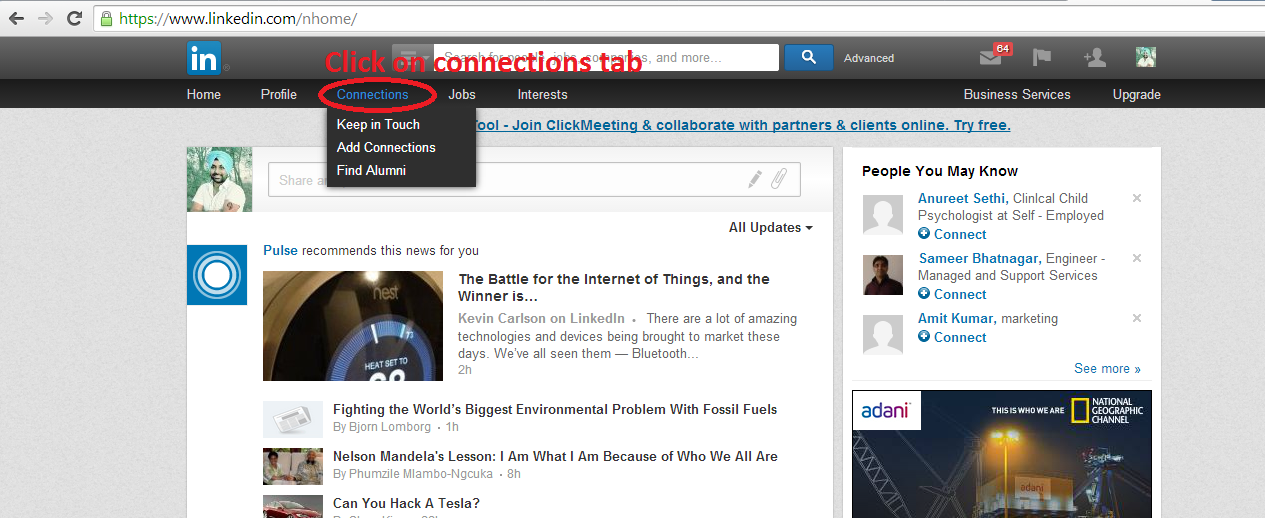
Step 2:   Click On "Connections" Tab on main Menu Bar in LinkedIn.

Connection Tab Preview


Step 3: Now you will see a "Gear Icon " in right side, Click on "Gear Icon" to open "Settings".

Gear Icon Preview


Step 4:  Now a setting page will be open and You will just a find  " Export Linkedin Connection" Option in right side. As its shown in below demonstrate picture.

Export Contacts Tab Preview


Step 5:  On this step it will ask you to choose your format of export connections. You should choose it " Yahoo Mail (CSV File) from drop down list and click on export to continue to fill Captcha and finish it. Now your LinkedIn connections will saved in your computer as Excel Supported CSV File.

Save Export File 


Steps 6 : Its Time to jump on your Facebook Profile and open your Facebook Page. Now click on " Build Audience" Tab and open "Import Contacts".

Import contacts option in facebook page

Steps 7: A new Pop-up windows will open, Choose " Upload contact list file" and click on "Invite Contacts".

Upload CSV File 

Steps 8:  This time it will show a browse button " Choose File" to select your LinkedIn Connections Export file from your Computer. So navigate your file and click on "Upload Contact" Button to move ahead.

Complete File Uploading

Steps 9:  Aaha, Now your all contacts will be shown in a Pop-up windows, Just click On "Select all" Option to select and click on "Preview Invitations" to continue process. 

Select All Imported Contacts In Facebook Page

Steps 10:  Finally You will see a Auto generated message for your contacts to Like your Facebook Page, Just Scroll Down and Click on " I Am authorized......" Option to check 
it. At final step click on "Send" button to send your request. It will show you a confirmation message that your invitations will deliver to your contacts shortly  

Final Preview Of Invitation Page 

Thats it ..Please feel free ask me for help in comments


8:25 am - By blogger 21

July 16, 2014

How to build your unique Facebook Profile

To project yourself in the world of internet, Its very essential that your profile should be unique and attractive. A unique and attractive profile of yours will definitely invite lots of people to connect with you on the Facebook. If your profile is unique then it will be easier for you to connect with the strangers, influential people and with the friends of your friends. Your profile is the first basic foundation to increase your appearance and existence on Facebook.
8:54 am - By blogger 0

June 12, 2014

How to easily create YouTube and Facebook apps in computer

Generally, We are well familiar with Facebook and YouTube apps in mobile because mostly we are using them to access Facebook or YouTube. Today I am going to explain a easy method to create these application in computer. Now question is, why we have need to create them?, because mostly people are using browser in their PC to access them. But answer is ,  After successfully create applications you can easily and directly use Facebook or YouTube without any other browser background activities and multitasks.


Youtube & Facebook Apps
People also Reading...


Here is a simple method to create them with in minute..


1. Open "Google Chrome" and open two tabs, now write "www.facebook.com" & " www.youtube.com


Lets first create "Facebook app". Open Facebook tab and click on Top right corner "settings icon > Tools > Create Application shortcut".


Now Click on "Create application Shortcut" and it will open a "pop-up" window to create application functions. Just click on " Create" Button to create a new Facebook for your computer.


After click on create, Facebook app will automatically install in your PC. You can find a app icon on your desktop window.

For to create YouTube app, All procedure has same as above, only you will have to choose "YouTube Tab ". Before to create app. Other will remain same. After create successfully both apps, you will get both apps icons on  " Desktop Window, Task-bar, & Start Menu.


You have done. Now click and open apps and enjoy them with direct access.


6:31 pm - By blogger 1

back to top