All Stories
Showing posts with label Linkedin. Show all posts

August 03, 2014

How To Send Facebook Friend Request to All Your LinkedIn Connections

If you have too many friends on LinkedIn and you want to include them in your Facebook account - Read this article carefully! As we know both Facebook and LinkedIn are very popular social networks, but so far there is no direct way of connecting with each other. 

Invite LinkedIn Connections to Join You on Facebook 
Also Read : " How to Invite Your All LinkedIn Connections to Like Your Facebook Page in Single Click"

After a long search on the internet, I found this method where I can send a Facebook  friend request to my 3000 LinkedIn connections in single click without fear of to block Facebook friend request. 

Lets Follow these simple steps to complete this task 

Step.1  Login to your LinkedIn profile and download your all connection in your computer to excel CSV Format. 

If you don't know, how it will save,  just read this ("How to Export Your LinkedIn Contacts in Your Computer")
       

Step.2 After Download your LinkedIn contacts now open this CSV File in Excel and copy all Email addresses from email column. 

Copy Emails From Excel File

Step.3 Now open your Facebook profile and open Facebook PHP invite Page than copy and paste your all Emails in "To Box" and type a Message in "Message box". For example you can type " Hello There, Please join me on Facebook" or anything whatever you like write. 

PHP Invite Page

After fill up above information, Finally click on "Invite Your Friends" Button to send your Facebook friend request. It will show you a confirmation message to successfully send  your friend requests along with all your email address. 
Thats It, You have done this successfully!!!!
Still If you are facing any problem please feel free write in comments.

Download This Article in a PDF Format -  

11:38 pm - By blogger 0

August 02, 2014

How to Export Your LinkedIn Contacts in Your Computer

LinkedIn has some nice options, practicality and applications that not everybody is aware of regarding. This is a reasonably straightforward little bit of practicality whereby you'll export all of your contacts to MS excel file including all their details like company, job title, email address etc.

Export LinkedIn Connections in Computer 

When you have your contacts in excel format, you'll do all the regular things like sorting and filtering. From there you'll simply add folks to your CRM, produce prospecting lists, E-Mail list building etc.


Follow these simple steps to download your all contacts in your Computer in excel format file.


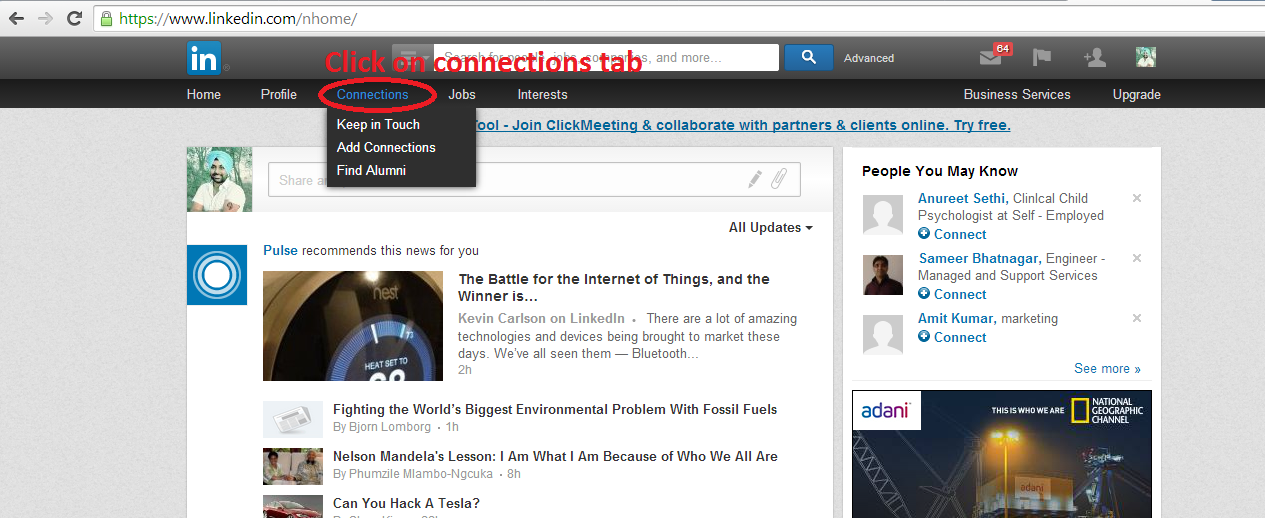
Step. 1 Click on "Connection" Tab in main menu bar.

Click on connection


Step. 2 Click On "Gear Icon" to open setting option


Gear Icon

Step. 3  Now click on "Export Connections" 

Export Connections

Step. 4 At this point, Click on "Export to" and expend "Drop Down" menu and choose "Yahoo Mail" option.

Choose Yahoo Mail option

Step. 5 Now it will ask you to fill up captcha image words for Verification.


Fill Captcha

Step. 6 After complete verification, Your connections will save in your computer into excel file.


Connections export successfully 

Thats It.. If you face any problem ask me in comments 


9:25 pm - By blogger 0

July 19, 2014

How to Invite Your All LinkedIn Connections to Like Your Facebook Page at Single Click

The LinkedIn and Facebook social networking sites permit you to create a network of contacts comprised of your fellow Facebook and LinkedIn users. So if you have a many LinkedIn connections and you want to invite them to like your Facebook page than read and follow this post carefully. Whereas neither website provides the power to directly export the connection  from LinkedIn to Facebook, through the utilization of LinkedIn's export feature, you'll export your LinkedIn contacts as Excel Supported CSV file and import that Excel Supported CSV file Facebook in an exceedingly few straight forward steps.


      Watch Video Tutorials Of This Trick


Instructions:

Follow these all steps to invite your LinkedIn connections to Like Your Facebook Page

Step 1:  Type www.linkedin.com in Browser and Login Your LinkedIn Profile 

Step 2:   Click On "Connections" Tab on main Menu Bar in LinkedIn.

Connection Tab Preview


Step 3: Now you will see a "Gear Icon " in right side, Click on "Gear Icon" to open "Settings".

Gear Icon Preview


Step 4:  Now a setting page will be open and You will just a find  " Export Linkedin Connection" Option in right side. As its shown in below demonstrate picture.

Export Contacts Tab Preview


Step 5:  On this step it will ask you to choose your format of export connections. You should choose it " Yahoo Mail (CSV File) from drop down list and click on export to continue to fill Captcha and finish it. Now your LinkedIn connections will saved in your computer as Excel Supported CSV File.

Save Export File 


Steps 6 : Its Time to jump on your Facebook Profile and open your Facebook Page. Now click on " Build Audience" Tab and open "Import Contacts".

Import contacts option in facebook page

Steps 7: A new Pop-up windows will open, Choose " Upload contact list file" and click on "Invite Contacts".

Upload CSV File 

Steps 8:  This time it will show a browse button " Choose File" to select your LinkedIn Connections Export file from your Computer. So navigate your file and click on "Upload Contact" Button to move ahead.

Complete File Uploading

Steps 9:  Aaha, Now your all contacts will be shown in a Pop-up windows, Just click On "Select all" Option to select and click on "Preview Invitations" to continue process. 

Select All Imported Contacts In Facebook Page

Steps 10:  Finally You will see a Auto generated message for your contacts to Like your Facebook Page, Just Scroll Down and Click on " I Am authorized......" Option to check 
it. At final step click on "Send" button to send your request. It will show you a confirmation message that your invitations will deliver to your contacts shortly  

Final Preview Of Invitation Page 

Thats it ..Please feel free ask me for help in comments


8:25 am - By blogger 21

December 30, 2013

How to add a publication to LinkedIn

Hello Friends Today I am going to write a small post on "LinkedIn Publication". As we know its a pretty option in LinkedIn to Publish anything, but some time its became difficult to find in profile.
linkedin
Add  publication in LinkedIn
     Here I have mentioned all steps with screenshot to choose "Publication Tab"

6:41 pm - By blogger 1

back to top